1. Define the page, audience and decision being reviewed
Start with a specific public page and the decision it should help someone make. A home page introduces the organization and its scope. A service landing explains work that can be commissioned. An educational guide answers a question without requiring the reader to become a customer. A private workspace is not an acquisition page at all. Classifying these roles prevents an audit from recommending a blog on every host or treating every page as if it should pursue the same conversion.
Write down the intended reader, the question, the preferred URL and the next step. For a B2B implementation service, the reader may be a marketing lead who needs to understand technical dependencies before requesting a proposal. For an engineering article, it may be a developer comparing model access options. Neither description should become a fictional persona padded with invented demographic data. The point is to make the content's purpose concrete enough that a reviewer can judge whether the page serves it.
Define the scope of your review too. Are you examining one template, a complete topic area or every public URL? Which hosts, languages and devices are included? Which accounts or datasets are unavailable? Keep a visible list of exclusions. A sampled audit can reveal important issues, but it does not certify unexamined pages. This checklist is meant to support that disciplined review; it does not create a platform-recognized readiness status or promise that a completed checklist will generate citations.
References: Google Search Central — Creating helpful, reliable, people-first content
2. Build an inventory before changing URLs
Compare the navigation, sitemap, editorial source and available search data. A route can exist in code without being discoverable through the interface, and a sitemap can retain a page that now redirects or fails. Record the URL, purpose, current response, preferred canonical and relevant links. Include important legacy pages instead of assuming that an old-looking address has no value. Search and backlink history, where available, help explain why a path should be preserved or carefully redirected rather than casually removed.
Classify the intended action: keep, improve, consolidate, redirect to an equivalent destination, exclude from indexing or preserve privately. These are not interchangeable operations. Low traffic in a short window does not establish that content is useless, and it does not authorize deleting client information or backups. When two pages overlap, identify their distinct questions before consolidating them. A guide and a commercial landing can legitimately discuss the same subject while serving different decisions; identical copy with different keyword titles usually needs closer review.
For any proposed redirect, specify the old URL, destination, reason and recovery path. Do not redirect every missing page to the home page merely to eliminate an error report. The destination should be meaningfully relevant. Check internal links so that they point directly to the intended public address. If the source of an old site cannot be recovered, record that limitation instead of pretending a new repository automatically preserves its content or search history. Inventory is a preservation step as well as an SEO task.
3. Test the actual HTTP response and preferred address
Request the public URL and examine the response rather than relying solely on a repository setting. Confirm HTTPS behavior, status and redirects, then inspect the HTML delivered for the intended host. A route that returns a successful status while showing a generic error message needs investigation. So does a valid page that redirects to an unrelated host. Test one nonexistent route as well as a valid one; a system that returns the home page for every path can conceal broken discovery and confuse users.
Each indexable page should identify its intended canonical address consistently with its actual content and links. Review trailing slashes, hostname aliases, parameters and language variants where they exist. Do not add alternate-language declarations for translations that are not available, and do not point every article's canonical at the home page through an inherited template. The right implementation depends on the site's architecture. The acceptance check is the served result for each relevant route pattern, not the mere presence of a metadata function.
Retain a small matrix of representative cases: the home page, a service, an article, a private route, a missing slug and an alternate host. Record what you expected and what you observed. This matrix should be rerun after changes that affect routing, exports, hosting or shared layout metadata. A successful build is useful evidence about compilation, but it cannot establish that a reverse proxy, domain rule or deployed artifact serves the correct version on the public host.
References: Google Search Central — AI features and your website
4. Separate crawl permission, indexing and private access
Read robots.txt as a crawl-control document, not a privacy policy or an authentication system. Google's documentation warns that a URL blocked from crawling can still be discovered and appear in search results. A public page that should not be indexed needs the relevant indexing control, and the crawler must be able to encounter that control. A page containing private customer records needs access enforcement, regardless of what the robots file says. Do not use one mechanism as a substitute for the other.
Test the effective controls on the deployed page and network path. A robots rule may allow crawling while a hosting layer denies requests. A preview environment may accidentally expose production-like content without appropriate indexing protection. Specific user-agent groups can have their own rules, so review the complete file rather than assuming one line applies universally. Keep the sitemap limited to appropriate public destinations, and avoid advertising private API paths as content merely because they happen to return a successful status without authentication.
Decide AI crawler policy by purpose. OpenAI distinguishes search crawling, training-related crawling and some user-initiated access. Google's Search guidance likewise explains the role of Googlebot separately from other controls. Review the current provider documentation before changing access. Allowing a training crawler is not a guarantee of being cited in search. Conversely, a broad block introduced without understanding its purpose can affect discovery in ways the content team did not intend. Record the decision and scope instead of copying an undifferentiated bot allowlist.
References: Google Search Central — Introduction to robots.txtGoogle Search Central — AI features and your websiteOpenAI — Overview of OpenAI Crawlers
5. Check that the useful answer is present and navigable
Read the page from the perspective of someone who knows the question but not your preferred terminology. The introduction should establish the answer or the scope without requiring a tour through company slogans. Headings should mark meaningful subquestions, and a longer article should offer a usable table of contents. A comparison should explain its criteria. A procedure should identify prerequisites, expected results and what to do when the result differs. These are communication checks, not a requirement to turn every heading into an exact-match keyword.
Inspect the text actually available in the rendered page and, where appropriate, the initial HTML. Essential explanations should not exist only inside images, video or interactions that a reader cannot access. Native expandable sections can be useful when their content is available and their controls work; do not assume that hiding important caveats behind a decorative interaction improves readability. Keep the answer's limitations near the claim. A passage that sounds definitive only because its conditions are several screens away is vulnerable to misunderstanding by people and automated summaries alike.
For a long-form article, depth should come from decisions, examples, alternatives and failure cases. Do not inflate the page with repeated definitions to meet a length target. Google explicitly says it does not have a preferred word count. If a project requests a substantial article, satisfy that requirement by making the subject more useful: show how to evaluate evidence, distinguish similar concepts and explain an implementation path. Review whether each section adds a new job for the reader rather than simply restating the introduction.
References: Google Search Central — Creating helpful, reliable, people-first contentGoogle Search Central — AI features and your website
6. Audit claims, authorship and the underlying evidence
Mark claims that a reasonable buyer would rely on: performance, reliability, supported integrations, privacy, compliance, certifications, pricing and customer outcomes. For each, identify the source and the exact scope it supports. A benchmark from a vendor is not a benchmark of your deployment. A prototype demonstration is not proof of an operating service. A successful test with synthetic data is not evidence of a customer's financial return. Make those distinctions visible before polishing the language around a claim.
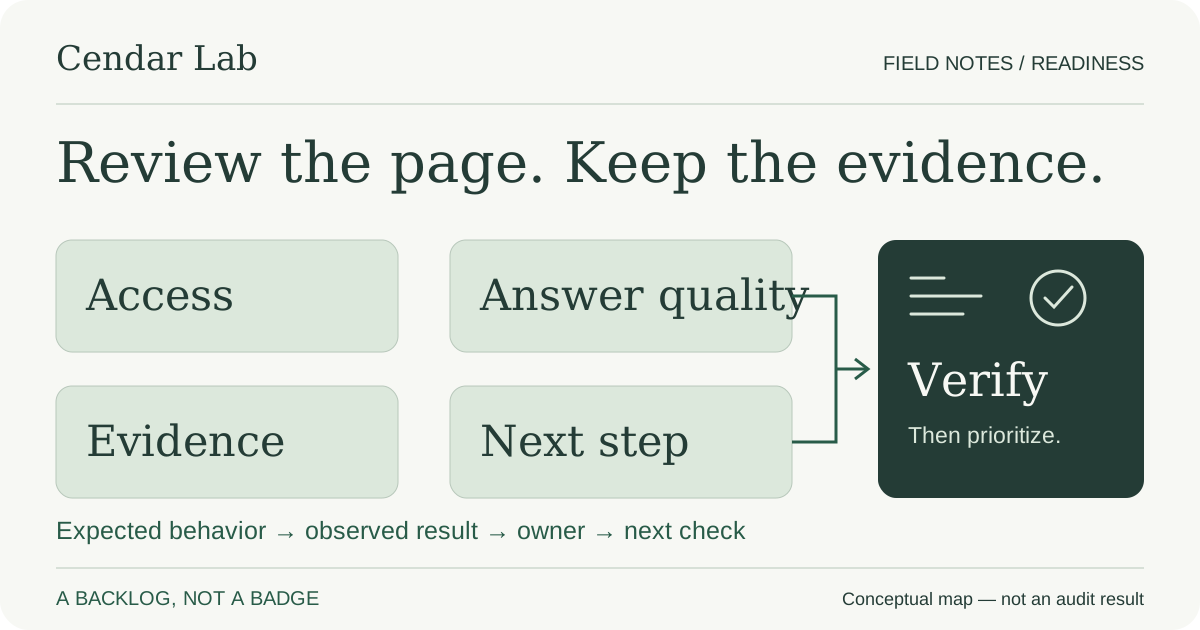
Review examples and images for implied evidence too. A graph with invented metrics can mislead even if the nearby prose avoids a numerical promise. A recognizable customer logo can imply endorsement that has not been granted. A screenshot can expose private records or silently omit a failure. Use original conceptual diagrams when you are explaining a method, and label them as conceptual. Use real results only when their collection, interpretation and publication are authorized and can be explained without revealing secrets or personal data.
Check the byline and review statements. Identify the real organization or person responsible, link relevant background when available and avoid inventing a specialist reviewer. If AI materially assisted production, an honest explanation of that role can help readers understand the method. Assign a responsible person to verify sensitive claims before release. Record which sources were consulted and when, especially for changing platform rules. A list of reputable domains at the bottom is not enough if none of those pages supports the statements beside them.
References: Google Search Central — Creating helpful, reliable, people-first contentGoogle Search Central — General structured data guidelines
7. Align structured data and metadata with visible content
Compare the page title, description, social preview and structured data with what a visitor actually sees. The article title should not promise a case study when the body is an illustrative checklist. A service page should not describe a subscription product in its schema if work is quoted individually. Keep dates, publisher identity and image references coherent. Where feasible, use a shared editorial source to generate these representations rather than maintaining several disconnected copies of the same claim.
Validate both syntax and meaning. A JSON parser can identify malformed data; a supported validation tool can report some structured-data issues. Neither establishes that a review is genuine, a price is approved or a certification exists. Google's policies require relevant, visible and accurate content, and eligibility does not guarantee a rich result. Prefer an appropriate description of the real page to an elaborate collection of types added solely because someone claims they are required for AEO.
Google's AI-feature documentation says there is no special schema or new AI text file required for inclusion in its AI features. If you maintain llms.txt or another discovery aid, check that its links exist and its claims match the site. It should not contain an old offer, a retired price or private endpoints. Generate it from maintained public sources when possible. Keep the result in perspective: a clean file is a maintenance outcome, not evidence that a platform has consumed it or will cite the page.
References: Google Search Central — General structured data guidelinesGoogle Search Central — AI features and your website
8. Give images a real explanatory job
Select an image because it helps explain the subject, not because every article needs a generic picture of a glowing robot. A conceptual map can clarify the relationship between crawlability, evidence and an answer. A sequence diagram can show which system owns an action. A real screenshot can demonstrate an interface when it has been reviewed for permission and private data. The article should identify which kind of evidence the image provides, so readers do not confuse a conceptual illustration with an observed product result.
Provide a descriptive alternative that communicates the image's role and keep essential conclusions in the surrounding text. If a diagram contains labels that become tiny on a phone, a caption or nearby explanation should preserve the meaning. Reserve image dimensions to avoid unnecessary layout movement and choose a format appropriate to the content. Vectors suit diagrams, while photographs generally need raster formats. A small file is useful, but its size alone does not prove a fast or stable experience under real user conditions.
Test the actual asset paths after a build. Verify that social previews reference an existing supported image and that the image is relevant to the page. Inspect the page at narrow widths and with zoom; a large comparison table or diagram should not force the entire document to overflow horizontally. Confirm licensing and attribution for third-party material. Original artwork avoids some licensing uncertainty, but it still needs factual review: an attractive diagram can encode the wrong relationship as easily as a paragraph can.
References: Google Search Central — AI features and your websiteGoogle Search Central — General structured data guidelines
9. Review internal links and the commercial handoff
A public guide should be discoverable from a relevant hub and connected to a useful next reading. Choose related articles by topic and decision rather than by their position in a data array. Use link text that identifies the destination. A beginner's definition can lead to a measurement guide; a measurement guide can lead to an implementation checklist. The service link belongs where it helps a reader who wants assistance, not in every paragraph as a substitute for explaining the subject.
On the landing page, check that the offer matches the incoming question. A person reading about technical SEO should not be forced to describe a CRM workflow just to ask for help. A person interested in email strategy should not find a button that implies an active campaign tool when the business provides scoped consulting and implementation. State deliverables, dependencies and exclusions. If a case study is not available, omit the proof block or use a clearly identified conceptual example rather than inventing a client story.
Exercise the inquiry path in isolation before inviting real traffic. Confirm validation, persistence, clear receipt, retry behavior and accessible error messages. A click is not a lead, and any successful HTTP status is not necessarily proof that a request was saved. Do not send production notifications or create real records merely to test a layout. After an authorized release, read-only production checks can verify content and routes; tests involving real messages, payments or customer records need their own approved scope.
10. Keep newsletter permission separate from interest in a service
Many B2B sites use the same content to attract readers and prospective customers, but those audiences have not necessarily granted the same permission. A person submitting a project question expects a response about that question. A person subscribing to field notes expects the declared editorial messages. Neither action authorizes marketing from another company in a group. Review forms, confirmation text and backend behavior together; a carefully worded checkbox does not help if the integration silently puts every contact into a promotional list.
If a newsletter is proposed but its operation is not ready, do not publish a form that collects addresses into an unmonitored file and calls the experience complete. Define the source of subscription state, confirmation process, preferences, suppression, unsubscribe mechanism and responsible operator first. Reuse an appropriate existing provider rather than building an email platform solely to add a marketing feature. Keep content accessible without requiring subscription unless there is a deliberate and justified reason for a separate access model.
Before any sending, validate sender identity, authentication, reply handling and delivery behavior under the relevant provider and jurisdiction requirements. Test failures and uncertain responses so retries do not create duplicates. A recipient's request to stop must affect pending messages, not only future imports. Treat openings and clicks cautiously because privacy systems and scanners can affect them. This checklist does not certify legal compliance or inbox placement; it identifies the operational questions that must be answered before email becomes part of the acquisition journey.
11. Establish evidence and acceptance checks before release
Each finding should state the expected behavior, observed evidence, impact, owner and next check. For example, an article canonical pointing to the home page is a specific defect with a reproducible acceptance test. A note saying that the site needs more authority is not. Keep screenshots as supporting context, but use the actual response, rendered text, schema and application behavior for the relevant contract. Record environment and date so that evidence from a local preview is not mistaken for a later production verification.
For a content release, verify references, link targets, image paths, heading structure and the intended next step. For a template change, include a missing route and a private route, not just the new happy path. Exercise mobile widths and keyboard navigation. Use field performance data when available and identify laboratory measurements as diagnostics rather than a replacement. A page can be visually attractive and still have inaccessible controls, missing assets or metadata inherited from the wrong template.
Prepare recovery before publishing. Identify the previous code or artifact and the configuration needed to restore it without overwriting newer customer data. A front-end release should not casually restart unrelated services or restore an old database. Agree who authorizes the release and who checks the live result. Once published, confirm that the intended host serves the intended version. That closes the implementation loop; subsequent indexing and citation observations belong to a separate measurement cycle with their own time and uncertainty.
12. Turn the checklist into a maintained backlog, not a badge
Prioritize the findings that most affect the reader, the business or the safety of the system. A private record exposed on a public route is not a low-priority marketing issue. An unsupported promise near a purchase decision may matter more than an optional metadata enhancement. A blocked foundational article may deserve attention before another new post. Assign owners according to the work: editorial, engineering, commercial or privacy. Avoid creating a large score that hides which conditions are actually blocking a useful journey.
After fixes, rerun the same checks and record the result and remaining limits. Passing a check should mean the observed defect changed as expected, not merely that someone marked a task complete. Revisit time-sensitive sources and recurring templates when the platform or content changes. Preserve earlier audit records as dated evidence instead of rewriting them to look as if the site had always been correct. The current state belongs in the maintained project notes; the history explains how that state was established.
Readiness is not permanent and is not a promise of distribution. A website can meet technical requirements and still not be selected for a particular answer. It can also receive a citation while containing weaknesses that deserve correction. The useful goal is a site that communicates its expertise accurately, protects private information and supports the next decision. This checklist gives a team a way to examine that goal methodically, make specific improvements and distinguish verified implementation from the reputation it still needs to earn over time.
References: Google Search Central — AI features and your websiteGoogle Search Central — Creating helpful, reliable, people-first content
Use the audit worksheet
Use one row per finding, not one score for the entire website. Start with the URL, record what you observed and when, explain the impact, and agree on an owner and acceptance check before changing anything. Mark unavailable evidence as not inspected rather than guessing. Keep credentials and customer information out of shared worksheets.
The row below is fictional: we did not inspect example.com. It demonstrates how a canonical finding can become an actionable task. Download the blank CSV, open it in your spreadsheet tool and replace the empty row with your own observations. No account, email address or form submission is required. Your completed worksheet stays in your own tools; this page does not upload it.
| URL | Finding | Evidence | Impact / priority | Owner | Proposed fix | Acceptance check |
|---|---|---|---|---|---|---|
| https://example.com/services | Service page identifies the home page as its canonical (fictional). | Illustrative observation: served HTML contains a canonical ending in /. In a real audit, retain the response, environment and date. | Conflicting preferred URL. Prioritize after confirming intent; no traffic loss has been measured. | Web maintainer, to be assigned. | Set this page's intended canonical after checking for duplicate or alternate URLs. | Request the page again; confirm one canonical for the intended URL and check related templates for regressions. |
Internal implementation example: restoring mobile navigation
This is work on Cendar Lab's own checklist, not a client result. While adding the worksheet, a mobile browser test could not reach its link through the guide's table of contents. The navigation existed in the HTML, but a global CSS rule hid nav elements at widths of 760 pixels or less. A desktop-only check would have missed that reading obstacle.
We gave the article's table-of-contents class an explicit display rule instead of changing every navigation menu. We also added the worksheet table, blank CSV and stable resource anchors to this existing URL. The original section-10 link remains attached to the newsletter-permission section. No competing article, gated download or newsletter subscription was introduced.
Verification scope: a local Next.js standalone build, not the live deployment. The mobile browser check failed before the navigation fix; the same journey was then rerun on the revised candidate. Checks cover the visible table of contents, reaching the worksheet, served HTML, table headers, the CSV response, keyboard scrolling and page overflow at 320, 390, 768 and 1280 pixels. Release and live-site verification remain separate.
The reproducible checks live in tests/organic-opportunities.spec.ts in the Cendar codebase. A reviewer can rerun them against the standalone build and inspect the result rather than accepting a screenshot as the entire test. Release approval and live checks remain separate. No ranking, citation or conversion improvement was measured; this record demonstrates an implementation change and its acceptance method, not a search outcome.
| Check | Starting version | Revised candidate |
|---|---|---|
| Mobile table of contents | Present in HTML, but hidden by a global nav rule at widths up to 760 pixels. | Article-specific display rule keeps the guide navigation visible; repeat the mobile link check. |
| Actionable worksheet | Prose described an audit backlog; no worksheet table or blank CSV. | A labeled table and a blank CSV on the existing checklist URL. |
| Service-to-resource links | Services linked to the general checklist. | Audit and implementation sections link directly to the worksheet and this record. |
| Acceptance method | New checks fail on missing resources and old headings. | Repeat those checks on the served build; inspect keyboard access, overflow and preserved links. |
| Search or business outcome | Not measured for this change. | Not measured. Local checks do not prove publication, indexing or commercial results. |