The short answer: Google Search Console does not separate AI traffic
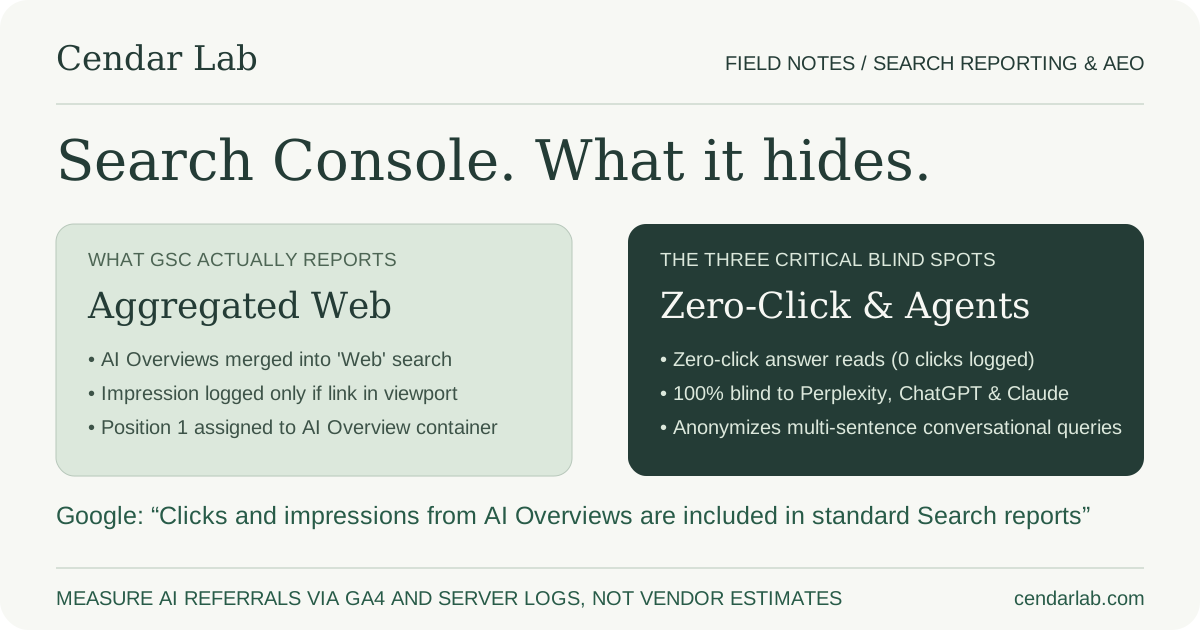
If you are searching Google Search Console for an ‘AI Overviews’ toggle, an ‘AI Mode’ tab, or a dedicated search appearance filter that reveals exactly how many clicks your website earned from generative answers, you will not find one. Google’s official documentation on AI features and Search Console reporting is explicit: impressions and clicks generated by links appearing inside AI Overviews are aggregated directly into the standard ‘Web’ search performance report.
This architectural decision has profound consequences for digital marketing and analytics teams. When you open your Performance report and examine your total clicks, impressions, and average position, those figures represent an undifferentiated mixture of traditional organic ‘10 blue links’, featured snippets, image thumbnails, and links embedded within AI Overviews. There is no native dimension, query filter, or API parameter that allows an engineer to isolate which portion of that traffic came from a generative synthesis versus a standard search result.
This absence of separation has created a lucrative market for marketing software vendors claiming to ‘unmask your AI Overviews traffic’ through proprietary reverse-engineering algorithms. It is essential to approach these commercial claims with intense skepticism. Unless an analytics platform possesses direct access to Google’s internal query serving logs, any breakdown that purports to tell you that exactly 1,420 of your 5,000 GSC clicks came from AI Overviews is relying on statistical estimation, synthetic prompt scraping, or pure guesswork.
Understanding what Google Search Console actually measures—and what it structurally conceals—is the only way to build a reliable measurement framework. Rather than relying on speculative third-party dashboards, engineering teams can use primary search console data alongside server access logs and web analytics to extract verifiable insights about how generative search is impacting their business.
References: Google Search Console — Performance report overviewGoogle Search Central — AI features and your website
The Search Appearance filter: what Google supports versus what marketers expect
A common point of confusion among technical teams is the ‘Search Appearance’ tab inside Google Search Console. Because Search Console provides appearance filters for rich result types like ‘Product snippets’, ‘Review snippets’, ‘Videos’, and ‘Merchant listings’, many teams assume an ‘AI Overviews’ filter must exist or is quietly rolling out under a different label. This assumption is incorrect.
Google uses Search Appearance filters exclusively to track structured data rich result formats that a site explicitly requests via Schema.org markup. For example, when you add valid `Product` schema, Google can programmatically verify whether your rich snippet badge rendered, and it logs that event under the matching Search Appearance dimension. Because AI Overviews are not triggered by a Schema.org tag—and require no proprietary markup from the publisher—they do not fit into Google’s Search Appearance taxonomy.
To understand why Google has resisted separating AI Overviews into its own reporting dimension, it helps to review the history of Featured Snippets. When Google introduced Featured Snippets more than a decade ago, SEOs immediately demanded a separate filter in Google Webmaster Tools. Google never provided one in standard reporting. Featured snippets remained mixed into standard web search metrics because Google treats snippets as an evolution of the core search interface, not as a distinct publisher feature.
By treating AI Overviews as standard web results, Google prevents publishers from calculating the exact macro-level traffic degradation caused by direct answer synthesis. If Search Console published a clean, isolated metric showing that AI Overviews caused a 40% aggregate decline in informational click-through rates across publishing sectors, that data would immediately become evidence in antitrust investigations and publisher copyright disputes. Keeping the data aggregated protects the platform from public scrutiny while leaving marketing teams to navigate the fog.
References: Google Search Console — Performance report overviewGoogle Search Central — AI features and your website
How impressions, clicks, and average position are calculated in AI Overviews
To interpret your Search Console data accurately, you have to understand the mechanical rules Google uses to count impressions, clicks, and ranking positions when an AI Overview is rendered on a search results page. These rules are documented in Google’s Search Console Help documentation on the Performance report, and they differ substantially from intuitive assumptions.
First, consider impression counting. A URL does not earn an impression simply because Google’s backend language model consulted the page when generating an AI Overview. An impression is logged only when a direct hyperlink to your URL appears on the search results page and scrolls into the user’s visible browser viewport. In an AI Overview, citations typically appear in an interactive carousel at the top-right of the block or as expandable footnote icons below individual sentences.
Crucially, if an AI Overview is rendered in a collapsed state—requiring the user to click ‘Show more’ to view the full synthesis and its associated citations—links hidden within the collapsed section do not earn an impression until the user explicitly expands the container. If a user reads the initial two-line preview and bounces, or if they scroll past the collapsed block without opening it, no impression is recorded for the cited URLs, even though their content informed the visible summary.
Second, consider click counting. A click is logged whenever a user clicks an outbound hyperlink pointing to your domain from within the AI Overview. Whether the user clicks a card in the citation carousel, a footnote link, or a text link within the synthesis, Google records it as a standard click for that query and URL. In Search Console, that click is mathematically identical to a click on a traditional organic search result.
Third, and most confusingly, consider position calculation. Google’s position tracking algorithm assigns ranking positions based on the visual layout of search elements from top to bottom. Because an AI Overview occupies the uppermost block of the search results page (often above traditional organic results), Google assigns all links contained within that AI Overview block the ranking position of the block itself. If the AI Overview is the first element below the query box, any link cited inside that overview is reported at position 1.
This creates a dramatic statistical distortion in historical reporting. A page that historically ranked at organic position 8 for a competitive query may suddenly report an average position of 1.4 in Search Console because it was cited in an AI Overview block. However, because clicks from AI citation carousels generally convert at lower rates than traditional top-three blue links, the page’s click-through rate (CTR) appears to collapse from 4% down to 0.8%. To an uninformed executive, it looks like the page achieved the #1 ranking but failed to capture clicks; in reality, the page was merely cited in a carousel where users rarely click.
References: Google Search Console — Performance report overviewGoogle Search Central — AI features and your website
What Google Search Console hides: the zero-click blind spot
The single greatest limitation of Google Search Console in 2026 is its structural inability to measure zero-click answers. Search Console is inherently an interaction-based and link-based reporting system. It tracks what URLs were shown and what URLs were clicked. It has no mechanism to measure semantic knowledge transfer when no link is displayed or clicked.
Consider a common scenario in technical research. A user searches for ‘what is the default timeout in bun fetch’. Google’s AI Overview synthesizes a direct, accurate three-sentence answer explaining that Bun fetch defaults to no timeout unless an AbortSignal is supplied, citing your technical article as the source. The user reads the answer, gets the exact syntax they need, and closes their browser tab. They never clicked a link.
In this scenario, your content successfully solved the user’s problem and reinforced your brand’s technical authority. But what does Google Search Console record? If your URL was displayed in the citation carousel and scrolled into view, GSC records exactly 1 impression and 0 clicks. If the query previously generated 1,000 monthly clicks from engineers who had to visit your blog to find the answer, your reported search traffic drops from 1,000 clicks to 0 clicks, while impressions remain flat. To a leadership team watching traditional organic traffic dashboards, the initiative appears to be an unmitigated disaster.
Even worse is the scenario where the AI Overview quotes your proprietary benchmark, framework name, or methodology without rendering a direct hyperlink to your site. In that case, GSC records nothing at all. Zero impressions, zero clicks, and zero queries. Your intellectual property was ingested, synthesized, and served to the end user, but because no DOM hyperlink was rendered, the event is completely invisible in search console telemetry.
References: Google Search Console — Performance report overviewGoogle Search Central — Creating helpful, reliable, people-first content
The missing queries problem: privacy thresholding in an era of conversational prompts
There is another mathematical distortion in Google Search Console that worsens significantly as search becomes conversational: query anonymization. In Search Console, when you examine the top summary cards (Total Clicks and Total Impressions) and compare them to the sum of all individual query rows in the table below, you will discover that the table rows add up to substantially less than the reported totals. In many technical websites, between 25% and 55% of all clicks belong to queries that are completely missing from the table.
Google documents this discrepancy under its privacy protection policies. To protect user privacy, Google does not display individual search queries that are issued very infrequently or that contain personal identifiers. In traditional keyword search, where millions of people typed the same three-word phrase like ‘best crm software’, most queries cleared this threshold easily.
However, conversational search prompts look completely different from legacy search keywords. Users interacting with generative features type long, nuanced, multi-sentence queries like ‘how do I configure Bun Elysia with Drizzle on Google Cloud Run without hitting connection pooling timeouts in PostgreSQL’. These hyper-specific, long-tail queries are often issued by only one or two users worldwide each month.
Because these multi-sentence conversational queries fail to clear Google’s privacy threshold, Search Console aggregates their impressions and clicks into the top-line site totals while scrubbing the actual query text from the report. As search behavior shifts increasingly toward conversational phrasing, a larger percentage of your real user queries vanish into the ‘anonymized queries’ bucket, leaving marketing teams blind to the exact questions prompting AI Overviews to cite their content.
References: Google Search Console — Performance report overviewGoogle Search Central — AI features and your website
The arithmetic of SERP pixel height: visual attention collapse
To understand why organic click-through rates have declined on informational queries even when rankings appear stable, one must measure the physical geometry of search engine result pages. In 2020, a standard Google search results page presented four paid ads at the top (occupying approximately 180 to 220 vertical pixels), followed immediately by the #1 organic blue link. On a standard 1080p desktop monitor or mobile viewport, the #1 organic result sat prominently above the fold.
In 2026, the layout is radically different. When a query triggers an AI Overview, the generative answer block occupies between 650 and 950 vertical pixels of screen height. On mobile devices with typical screen heights of 800 to 900 pixels, the AI Overview consumes the entire initial viewport. Below the AI Overview, Google frequently inserts a ‘People Also Ask’ accordion block (another 200 pixels) or sponsored commercial carousels.
As a result, the #1 traditional organic blue link has been physically displaced downwards by an average of 700 pixels. On mobile devices, a user must swipe through nearly two full screens of content before encountering the first standard organic result. Even though Google Search Console continues to report that your URL holds ‘Average Position: 1.0’, the reality is that your link has been pushed below the visual threshold of attention.
This spatial displacement explains why calculating CTR expectations based on historical 2020 benchmarks is fatally flawed. Historically, position 1 commanded a 28% to 35% click-through rate. In an AI Overview environment, position 1 inside the citation carousel often produces a CTR between 0.5% and 2.5%, while the first organic blue link below the block captures only 8% to 12%. The traffic drop is not caused by algorithmic demotion, but by the physical displacement of user attention.
References: Google Search Console — Performance report overviewGoogle Search Central — Creating helpful, reliable, people-first content
External AI search engines: the traffic that never reaches Search Console
A second fundamental blind spot is that Google Search Console measures exclusively Google Search. In 2026, a rapidly expanding share of technical, B2B, and commercial information retrieval takes place outside Google entirely—on platforms like Perplexity, ChatGPT Search, Claude with web search, Microsoft Copilot, and specialized vertical agents.
None of these external platforms report their metrics into Google Search Console. If Perplexity cites your engineering guide 50,000 times this month to answer enterprise architecture queries, Google Search Console will show zero record of that activity. If an engineer asks ChatGPT Search to recommend an AEO consultancy and ChatGPT provides a direct link to your services page, that referral bypasses Google’s infrastructure completely.
Tracking these external answer engines requires shifting your focus from search console reports to web server logs and web analytics platforms like Google Analytics 4 (GA4), PostHog, or Cloudflare Web Analytics. However, measuring AI search traffic in web analytics introduces its own set of technical challenges, primarily centered around HTTP referrers and dark traffic.
When a user clicks a citation link inside an external AI engine, the browser typically sends an HTTP `Referer` header identifying the origin. For example, Perplexity sends `https://www.perplexity.ai/`, and ChatGPT web search sends `https://chatgpt.com/`. However, mobile app clients—such as the ChatGPT iOS app or Perplexity Android app—often send app-specific referrers (such as `android-app://com.openai.chatgpt`) or strip the referrer entirely due to operating system privacy policies. When the referrer is stripped, that high-intent AI referral arrives at your web server as unclassified ‘Direct / None’ traffic, obscuring its true origin.
References: Google Search Console — Performance report overviewOpenAI — Overview of OpenAI CrawlersPerplexity — PerplexityBot and Perplexity-UserAnthropic — Does Anthropic crawl data from the web, and how can site owners block the crawler?
Separating bot crawls from user visits in server access logs
To understand how AI platforms interact with your website, technical teams must distinguish between three completely different types of automated traffic: model training crawlers, search indexing crawlers, and user-initiated fetching bots. Confusing these three categories leads to wildly inaccurate reporting.
| User Agent Family | Bot Name | Primary Operational Purpose | How to Measure in Logs |
|---|---|---|---|
| OpenAI | GPTBot | Crawls content to train future foundation models. Does NOT power live search answers. | Filter web server logs by user-agent string containing `GPTBot`. Low immediate business value. |
| OpenAI | OAI-SearchBot | Crawls and indexes web pages specifically for ChatGPT Search results. | Filter server logs by user-agent `OAI-SearchBot`. High business value; indicates active search indexing. |
| OpenAI | ChatGPT-User | Executes live, on-demand fetches when a human user prompts ChatGPT to inspect a specific URL. | Filter logs by user-agent `ChatGPT-User`. Direct evidence of human prompt engagement in real time. |
| Anthropic | ClaudeBot | Crawls the web to build training datasets for future Claude models. | Filter logs by user-agent `ClaudeBot`. Training crawler; respect robots.txt directives. |
| Anthropic | Claude-SearchBot & Claude-User | Indexes content for Claude search features and executes on-demand user prompt fetches. | Filter logs by `Claude-SearchBot` and `Claude-User`. Indicates live agent interaction with your content. |
| Perplexity | PerplexityBot & Perplexity-User | Indexes content for Perplexity answers and fetches real-time links requested by searchers. | Filter logs by `PerplexityBot` and `Perplexity-User`. Correlates directly with conversational answer citations. |
References: OpenAI — Overview of OpenAI CrawlersPerplexity — PerplexityBot and Perplexity-UserAnthropic — Does Anthropic crawl data from the web, and how can site owners block the crawler?Google Search Central — Introduction to robots.txt
Building a legitimate AI search measurement stack without snake oil
Rather than purchasing expensive, opaque software that promises to reverse-engineer AI Overviews, engineering and marketing teams can deploy an evidence-led, four-tier measurement stack using infrastructure they already control.
Tier 1: Google Search Console query intent cohort tracking. Divide your GSC queries into informational queries (e.g. definitions, how-to guides, checklists) and transactional/branded queries (e.g. your company name, specific product features, pricing terms). Monitor the CTR trends of each cohort over 12-month trailing windows. If impressions for informational queries remain steady or rise while CTR declines by 30% to 50%, that divergence is your strongest proxy signal of AI Overview suppression.
Tier 2: GA4 custom channel grouping for generative AI referrers. Configure a custom channel grouping in Google Analytics 4 named ‘Generative AI Referrals’. Define rule conditions that capture traffic where the Source matches regex patterns for `chatgpt\.com|perplexity\.ai|claude\.ai|copilot\.microsoft\.com|gemini\.google\.com` or where the Source starts with `android-app://com.openai` or `android-app://ai.perplexity`. This isolates real human visits originating from conversational assistants into a dedicated reporting channel, allowing you to measure conversion rates, session duration, and downstream revenue.
Tier 3: Server access log telemetry for user-initiated fetch agents. Set up automated log parsing on your web servers (via Cloudflare Logpush, GCP Cloud Logging, or AWS Athena). Write automated daily queries that count requests from user-initiated agent bots: `ChatGPT-User`, `Perplexity-User`, and `Claude-User`. Because these bots fetch pages only when an active user specifically submits a prompt or clicks a source link, tracking the frequency of these requests provides an unadulterated, real-time barometer of your content’s utility to AI users.
Tier 4: Longitudinal prompt benchmarking. Define a fixed benchmark of 20 to 30 highly relevant commercial and technical prompts that your target buyers ask. Once per quarter, execute these prompts programmatically or manually across ChatGPT Search, Perplexity Pro, Claude, and Google Search in consistent incognito environments. Record which domains are cited, whether your brand is mentioned, whether the cited facts are accurate, and what sentiment is conveyed. Tracking citation share over time on a fixed prompt cohort is vastly more actionable than chasing volatile third-party visibility scores.
References: Google Search Console — Performance report overviewGoogle Search Central — AI features and your websiteOpenAI — Overview of OpenAI CrawlersPerplexity — PerplexityBot and Perplexity-User
Configuring server log telemetry for AI agent monitoring
To implement Tier 3 of the measurement stack effectively, engineering teams need concrete logging configurations. Standard web analytics scripts (like Google Analytics JavaScript tags) are executed in client-side browsers and never fire when an AI backend crawler or headless scraper fetches your HTML. The only place where crawler activity is recorded is in your edge web server access logs.
In Nginx or Traefik reverse proxies, ensure your access log format captures the exact, unclipped `$http_user_agent` string and the upstream response time. In modern cloud environments like Google Cloud Platform (Cloud Run, Google Cloud Load Balancing), access logs are ingested automatically into GCP Cloud Logging. You can create a real-time log-based metric in Google Cloud Monitoring using the following filter expression: `resource.type="http_load_balancer" httpRequest.userAgent=~"(ChatGPT-User|Perplexity-User|Claude-User)"`. This metric increments every time an on-demand AI assistant fetches content on behalf of a human user.
For teams operating on Cloudflare, you can configure Cloudflare Logpush to stream HTTP requests directly to an Amazon S3 bucket or Google Cloud Storage bucket in NDJSON format. By querying these logs using ClickHouse, BigQuery, or DuckDB, you can generate weekly dashboards showing which technical articles are most frequently consulted by AI assistants, what HTTP status codes they receive, and whether any autonomous agents are being inadvertently blocked by rate limits or Web Application Firewall (WAF) challenges.
References: Google Search Central — Introduction to robots.txtOpenAI — Overview of OpenAI CrawlersPerplexity — PerplexityBot and Perplexity-User
Decision matrix: what GSC tells you, what it obscures, and where to look
Use the following matrix to guide executive discussions and client reporting. Separating verified search metrics from unmeasured conversational phenomena prevents teams from drawing catastrophic conclusions from incomplete data.
| Measurement Objective | What GSC Reports | What GSC Hides | Where to Look Instead |
|---|---|---|---|
| Tracking clicks from Google AI Overviews | Aggregated total clicks inside the standard 'Web' search report. | Cannot separate AI Overview clicks from standard blue link clicks. | GSC Query Cohort CTR divergence; correlate informational CTR drops against stable impressions. |
| Measuring zero-click brand impressions in AI answers | Zero data if no link was displayed; standard impression if link was visible in viewport. | Cannot measure whether the user actually read the synthesized text or noticed your brand. | Longitudinal prompt benchmarking; branded search volume trends in GSC. |
| Evaluating average ranking position in AI Overviews | Reports position 1 if the AI Overview block appears at the top of the SERP. | Masks organic blue link ranking; distorts overall CTR expectations for position 1. | Inspect GSC query-level position history; compare pre-AI Overview baseline positions. |
| Tracking referrals from ChatGPT, Perplexity, and Claude | Zero data. GSC has zero visibility into external non-Google platforms. | 100% blind to non-Google conversational search traffic. | GA4 Custom Channel Grouping for AI Referrers; server access logs for `*-User` agent strings. |
| Verifying whether AI models crawl your technical documentation | Zero data. GSC reports search crawler activity for Googlebot only. | Completely ignores OpenAI, Anthropic, and Perplexity indexing crawlers. | Web server access logs filtered by `OAI-SearchBot`, `Claude-SearchBot`, and `PerplexityBot`. |
References: Google Search Console — Performance report overviewGoogle Search Central — AI features and your websiteOpenAI — Overview of OpenAI CrawlersPerplexity — PerplexityBot and Perplexity-User